

The only things that are better than the things you pay less for, are the things you pay nothing for. That is one of the reasons you may need the Amazon Giveaway App.
It will simply be pointless to point out that Amazon has become the largest store in the world for almost anything you may be looking for. The e-commerce platform does not just bring and sell products and services to people, but you may be lucky enough to find the great deals, coupon codes, gift cards, and a lot of other things including freebies.
Through these giveaways, sellers on Amazon get to market their products by offering them for free. The best thing about these giveaways is that they come to you completely free with everything including the tax and shipping paid for. Through these, marketers get to engage with customers and get their products reviewed.
Winners from these giveaways are either randomly selected or they are selected based on the number of signups, views, or in a particular order.
How To Win Daily And Holiday Giveaways
Amazon giveaways come in two forms, the daily giveaways, and the holiday giveaways.
Daily Giveaways
These giveaways are done every day as the name suggests, with many products listed. Unlike the Amazon holiday giveaway, the daily ones have become very normal that you can simply go to Amazon or the Amazon Giveaway App and play for them. They do not expire with time, although each product will be promoted for sometime before it is taken off.
Holiday Giveaway
There are various holidays such as the Amazon Prime Day where you can get to have the giveaways. Most of these holidays do not only come with giveaways, but also amazing discounts like what you get with Amazon Black Friday.
How to win
If you have the Amazon Giveaway App, what you need to do to win is to launch the app and search “Chance to Win”. This will provide you with the promos that are going on at a particular time. Most of the promotions get to last between a day and 30 days.
Instead of continuously searching through many products that you may not even need, you can streamline your app in such a way that you will get notified each time products that you need are added. This will be done by the app automatically based on your search results. To do this, here are the steps:
- After you must have launched your app and signed in, tap the left side of your app to open the menu
- Scroll down and tap on settings.
- Go to “Your Recommendations” and enable the “Personalised Notifications”.
- With that, you will be receiving recommendations based on your shopping and the products you are searching for.
This, however, does not stop you from still going to look for more of the products that you can play.
The most important thing to know is that winning a product will not be easy because there are so many other people that are also playing to win the same products. There are, in fact, many people that have played for months without winning a thing, but there are also others lucky enough to win more than a couple. Here are the processes to win:
- Open your App
- Search for “Chance to win giveaway”
- Before the product listings, you will see a banner “Today’s Giveaways- Enter to win”. Click on it.
- This will take you to different available products that you can win. Select the product you want.
- You will either have an Amazon box to open or a video to watch for between 15 and 30 seconds. After the video, a box will also appear. Click on it and if you win, you will be notified. If not, you will need to keep trying.
If you win anything from the Amazon giveaway, you will get an email notifying you that you have won, and then the product will be transferred to the shipping address you provided.
Amazon Giveaway App
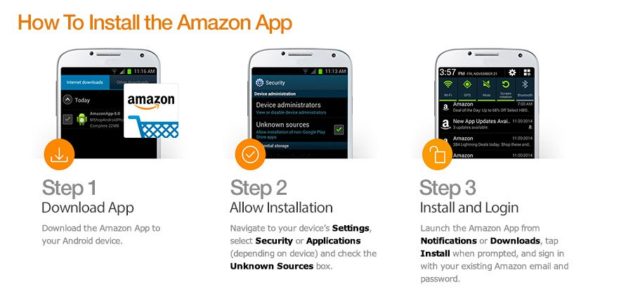
One of the best ways that you can get these Amazon giveaways is through the Amazon giveaway app which you can simply download and check for the daily giveaways available or those for different holidays.
Some of the advantages that you get with the app is that there is the convenience for you to keep playing to win, and at the same time, it allows you to customize and get notification based on the things that you want.
See Also: Uplay: Download, Account Login, Free games, Support, Promo Code
The app is available for both iOS and Android mobile devices. To download the app, you can either go to App Store if you are using iOS device or Google Play for Android device to search for it. However, here is the easy way to download the app:
- Go to the Amazon App page
- Here, you will have the option of either putting in your email to receive the link to the app or download it directly which may be better.
- To download directly, scroll down to select the link to Google Play if you are using an Android device or App Store if you are using iOS.
- You will be redirected to the right store where all you need do is to click on install and it will download and be installed to your device.
- After it has been downloaded and installed, you will need to sign in before you start playing to win.
Give Away List
The giveaway list is arranged either based on your shipping or based on the available products that are in the giveaway for the holiday or for the day. The list will have many products from homecare to electronics, fashion items, and almost every other product that is available.
Before selecting a product to play for, you may need to check the product to see if it has any requirement. Most of them will come with no requirements, while some will want you to watch a short clip, follow someone, or do some other things.
There are some products that even when you enter and don’t win, you get various discounts on the products. The discounts are also placed in the lists of the products alongside their requirements.
